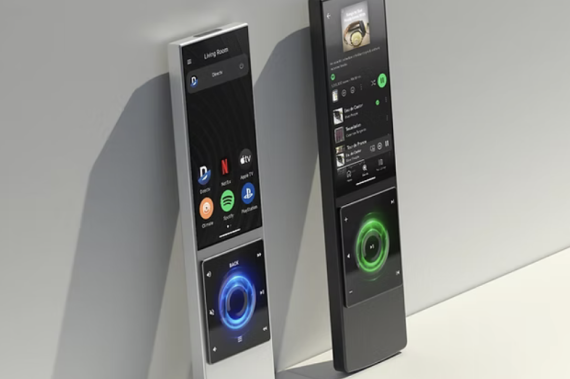
We are huge fans of the AVA Cinema Remote Control and AVA OS 2.2.0 has landed!!
AVA OS 2.2.0 is here! It’s all about making installs faster and easier to troubleshoot day to day—especially when discovering Nano Brains on the network, switching between projects, and updating. You’ll also find meaningful upgrades to webhooks, a better two-way volume experience, new IP drivers and a bunch of driver improvements (including Samsung Frame and Sony AVR).
Let’s dig in!
Highlights
- Much faster “Change Project”: Jump between projects fast, with less waiting and no app restarts. This is especially practical for installers who configure systems using the AVA app on MacOS or Windows going from customer to customer.
- New IP Drivers: The frequently-requested Zidoo streamers are now supported in AVA OS and same for R_volution.
- Webhooks upgrades: Webhooks now support PUT and custom HTTP headers. We also added a guardrail confirmation when deleting a webhook step from a Flow.
- Better volume UX: New global volume pop-up for two-way volume devices. There is also an option to enable the side-button for volume control.
- Firmware update experience improvements: Clearer update progress feedback and reliability improvements to help updates feel faster, safer and more transparent. (You will see it later this month when AVA releases the new Nano Brain Firmware.)
New Features & UX Improvements
- AVA OS Volume control via physical side buttons (optional)
Enable in Settings → Cinema Remote / Home Remote / Companion.
- Global volume pop-up for two-way volume devices
A consistent on-screen volume experience (aligned with AVA’s Sonos volume UI style) for AVRs that provide volume feedback (using IP driver).
- System info improvements for Nano Brains
Settings → System now shows Network Connection type (Ethernet vs Wi‑Fi).
- Setup improvements
You can now create a room during first-time setup.
- UI polish
Home screen “rubber-band” effect when there isn’t a second page of Flows.- Removed dynamic AppBar color changes in the Sonos experience for a calmer, more consistent look.
- Fixed cut-off / incorrect rendering for Lights & Shades sliders.
- Dynamic Keypad visual tweak when opening the Shades slide (to match Shade Flow color).
- Demo Project Updated
- New demo project including Lights and Shades - See how to best use Demo mode in the 2-minute video "Creating a Sales Demo System…Fast!"
- New demo project including Lights and Shades - See how to best use Demo mode in the 2-minute video "Creating a Sales Demo System…Fast!"
Webhooks
- PUT support for Webhooks.
- Custom HTTP headers supported.
- New “test step” for Webhooks to help validate behavior before relying on it in the field.
- Confirmation dialog when deleting a webhook step (prevents accidental deletions).
- Reminder: Use the AVA companion app on Mac or Windows to make it easy to edit webhook steps.
New IP Drivers
- R‑Volution (IP driver) - Added a dedicated driver for seamless integration of R-Volution media players.
- Zidoo streaming boxes (IP driver) - Added a fully fledged driver with media control, ToughLink support, and highly responsive control.
IP Driver Enhancements
- Samsung The Frame
- Added a dedicated Art Mode OFF command.
- Art Mode OFF is also sent along with the Power ON to improve reliability when exiting Art Mode.
- Adjusted Delay handling for Power On to improve consistency, especially when exiting Art Mode. (This delay can be shortened on certain models).
- Improved power management: Further refinements added to handle how Samsung keeps changing behavior over the years.
- Sony AVR
- Two-way volume support.
- Fix for sound mode commands.
- Apple TV
- Fixed the CANAL+ label icon display issue.
Other Improvements & Fixes
- Discovery and identification improvements
- mDNS + SSDP discovery improvements for better reliability across a wider range of networks.
- Bluetooth discovery for bringing new Nano Brains onto the Wifi network (this is a preparation for a new Nano Brain firmware that we aim to release later this month.
- Icons
Added even more Flow icons (multiple brands/services)
- Flows
Fixed: Duplicate Flows could be disrupted after replacing an AVR.
Availability
AVA OS 2.2.0 is available worldwide today.
How to Get to AVA OS 2.2.0
AVA OS updates are non-disruptive.
- Cinema Remote & Home Remote — AVA remotes update automatically when on their charging dock. You can also get the latest version of AVA OS from the Play Store as an update to the AVA app.
???? Pro Tip You can get to the Play Store fast from Settings → General.
- AVA Nano Brain — Find the Update Available red badge on any remote connected to the Nano Brain.
- AVA companion app — Windows, Mac OS, iPad, iPhone, and Android will be available at ava.com/download. Companion app 2.2.0 rolls out in the next few days.